
Matterport для студии и малогабаритки: как показать пространство выгодно

Matterport for studios and small spaces: how to show space profitably

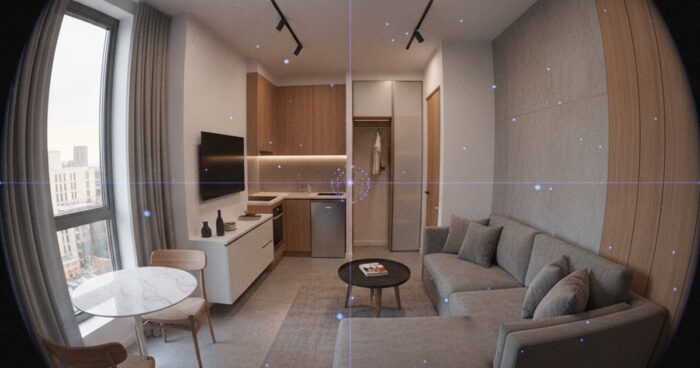
Home buyers and renters often face the challenge of estimating the size and layout of a space from photographs. This is especially true for studios and small apartments, where every square meter counts. To showcase a space to your advantage and give potential buyers or tenants a complete picture of the property, you can use Matterport technology. What is Matterport? Matterport is a 3D virtual tour technology that allows users to tour properties in real time. With Matterport, you can create a detailed and interactive model of a room, including everything from the layout to the texture of the walls and flooring. This technology is especially useful for studios and small apartments, as it allows potential buyers or renters to evaluate the size and layout of the space, and see how the available space can be used. Benefits of Matterport for Studios and Small Apartments There are several benefits to using Matterport for studios and small apartments: Increased engagement with potential buyers or tenants: 3D Virtual Tours allow users to explore a property in real time, increasing their engagement and interest in the property. Reduce viewings: Matterport allows potential buyers or renters to evaluate a property remotely, reducing viewings and saving time. Improved understanding of layout and dimensions: 3D virtual tours provide an accurate understanding of the layout and dimensions of a property, which helps potential buyers or tenants evaluate a property more accurately. How to Create a 3D Virtual Tour Using Matterport Creating a 3D virtual tour using Matterport is a relatively simple process. To do this, you need to: Gather the necessary equipment: To create a 3D virtual tour, you need special equipment, such as a Matterport Pro or Pro2 camera. Take photos and scan the space: The Matterport camera takes photos and scans the space, creating a detailed and accurate model of the room. Process and mount data: The received data is processed and edited in Matterport software, creating a 3D virtual tour. Tips for Creating an Effective 3D Virtual Tour To create an effective 3D virtual tour, you need to follow beberapa's tips: Make sure the property is clean and ready to shoot: Make sure the property is clean and ready to shoot to get the best results. Use good lighting: Good lighting can greatly improve the quality of your 3D virtual tour. Take multiple photos from different angles: Take multiple photos from different angles to give potential buyers or renters a complete picture of the property. Examples of successful use of Matterport Matterport is already used by many companies and individuals to display properties. For example, 360° Space has created 3D virtual tours for many properties, including studios and small apartments. See all projects → If you are interested in creating a 3D virtual tour for your property, we recommend that you contact a professional. Our company offers services for creating 3D virtual tours using Matterport. Check out our projects and contact us to find out more about our services. Calculate costProject catalogMatterport
виртуальный тур по самолёту — 360space.ru

Virtual tour of the aircraft and aircraft: aviation 3D inspection

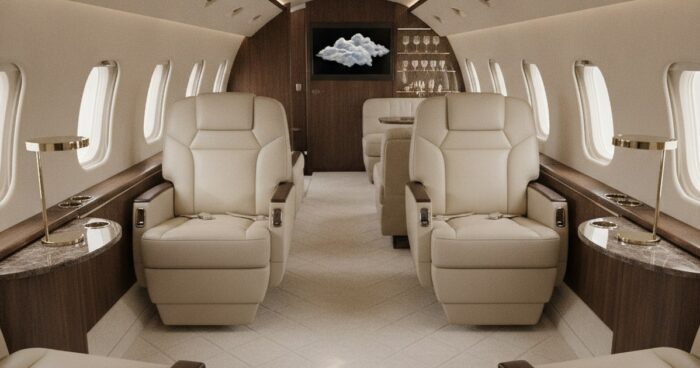
Aircraft and Aircraft Virtual Tour: Aviation 3D Inspection In Brief: Aircraft Virtual Tour is a powerful tool for airlines, manufacturers and training centers. It allows you to view the interior and exterior of an aircraft in detail in 3D, increasing interactivity and accessibility of information. For example, a large helicopter manufacturer in Russia used our tour to demonstrate a new model at an international exhibition. A virtual aircraft tour opens up new horizons for showcasing aircraft, be it a commercial airliner, private jet, cargo aircraft or helicopter. At 360° Space, we create tours that allow you to literally walk through the cabin, look into the cockpit, or look at the design details without leaving your home or office. These are not just pretty pictures, but a functional tool that solves specific business problems. Why do you need a 3D aircraft tour? The use of virtual tours in aviation is much wider than it seems at first glance. We see our customers using them for a variety of purposes: Accelerating sales and leases: Potential buyers or lessees can view the aircraft in detail prior to a physical inspection. This reduces the number of empty impressions and increases conversions. One of our clients, a business jet broker, noted a 30% increase in the number of qualified inquiries after introducing 3D tours on their website. Effective Training and Drilling: Aviation training centers use tours to familiarize pilots and flight attendants with the aircraft layout and the location of emergency equipment. This is especially true for new types of aircraft or when conducting briefings without access to the actual aircraft. Attracting customers at exhibitions and shows: At air shows, where every square meter of space is expensive and the number of visitors is huge, a virtual tour allows you to show as much detail as possible, even if access to the real aircraft is limited. We were doing a tour for a business jet manufacturer who was using it at a booth to allow visitors to “visit” an aircraft that was not physically on display. Marketing and PR: Airlines can use tours to showcase their cabins in different classes of service, attracting passengers. This is a great way to show the level of comfort and service. Documenting the condition of the aircraft: For maintenance or insurance companies, a 3D tour can serve as a detailed record of the condition of the interior and exterior of the aircraft at a specific point in time. How it works: the filming process, timing, result The process of creating a virtual tour of an aircraft requires a special approach, because you have to work in a limited space and with a valuable object. Our 360° Space team has experience in such filming. First, we discuss with the client the goals and objectives of the tour: what exactly needs to be shown, what interactive elements to add (information labels about the characteristics of the seats, the location of emergency exits, multimedia screens). Then we plan the shooting. For aircraft, this is always an individual schedule so as not to interfere with operation or maintenance. The survey itself takes from a few hours to a full day, depending on the size of the aircraft and the number of points. For example, 2-3 hours is enough for a small business jet, but 6-8 hours may be required for a wide-body passenger airliner. We use professional equipment, including Matterport cameras, which allows us to obtain highly detailed 3D models and panoramic images. After shooting, the data processing stage begins. This includes stitching panoramas, creating a 3D model, adding interactive elements (video, photos, text, links). The entire process, from filming to the finished tour, usually takes from 3 to 7 business days. The result is a full-fledged virtual tour, available online, which can be embedded on any website or used offline. Flexibility in placement is one of our advantages. You can host the tour in the 360° Space cloud, which guarantees high loading speeds and technical support. If you have your own servers, we can deploy the tour on your infrastructure. And for exhibitions or offline work, we make an offline version that runs on a PC without the Internet, or even a separate assembly for a VR headset. View all projects → How much does a virtual plane tour cost? The cost of a virtual aircraft tour is determined by several factors: the size of the aircraft, the number of filming points required, the complexity of the interior, and the amount of interactive elements that need to be added. Obviously, filming a small helicopter will cost significantly less than filming the interior of a Boeing 747. Our prices start at RUB 15,000 for small objects. For larger and more complex projects, such as passenger airliners or entire hangars with several aircraft, the cost will be higher and calculated individually. For example, filming the interior of a business jet usually costs in the range of 30,000 – 60,000 rubles, depending on the detail and additional options. We always recommend contacting us for an accurate quote as each project is unique. You can use our online calculator on the website to get an estimated cost, or just call us and we will prepare a detailed quote. Frequently asked questions Q: Is it possible to remove only the cockpit? A: Yes, of course. We can focus on capturing specific areas of the aircraft, such as just the cockpit or just the first class cabin. This will help optimize cost and timing. Q: How quickly will the tour be ready after filming? A: Typically, the process from shooting to the finished tour takes 3 to 7 business days, depending on the complexity and amount of post-production. For urgent projects, expedited processing is possible by agreement. Q: Do I need internet access to view the tour? A: The main version of the tour, hosted in the 360° Space cloud or on your server, requires access to the Internet. However, we can also prepare an offline version that works without a network connection, for example, for demonstration at exhibitions or presentations from a laptop. Calculate costProject catalogMatterport